
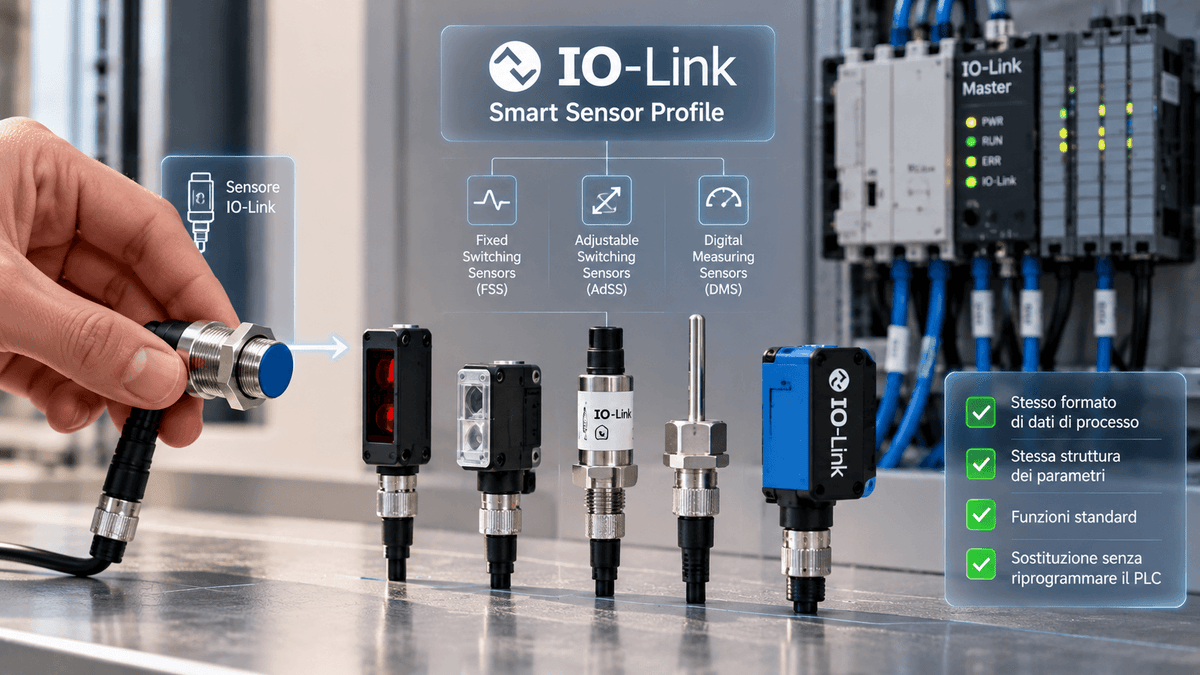
On 1 and 8 October 2026, the PI Italia Consortium organized the IO-Link Day, in two stages, in Erbusco (Brescia) and Francavilla al Mare (Chieti). Among the topics of the program, alongside IO-Link Safety and IT/OT convergence, there was also the Smart Sensor Profile and access to sensor and actuator data. It is a less visible topic than other innovations, but very concrete for those who design or maintain machines: it concerns the possibility of replacing one sensor with another without having to redo the PLC program.
In this article we explain what IO-Link device profiles are, what the Smart Sensor Profile standardizes, and what checks still remain necessary when changing a sensor.
The problem: IO-Link describes devices, but does not make them equal
With IO-Link, every sensor has a description file, the IODD, which contains identification, parameters, and device data. This allows remote configuration and parameterization, but does not guarantee that two similar sensors will behave in the same way. According to the IO-Link Community, process data, configuration parameters, and functions are not always standardized: even very similar sensors, even from the same manufacturer, can use different parameter specifications. The practical result is that the PLC program, or the function blocks used, often remain tied to a precise model.
What are IO-Link device profiles
Profiles give devices a common structure, so that the main difference remains identification. At the base is the Common Profile, which all IO-Link devices support: it defines uniform identification and diagnostic information and firmware update support. The other profiles build on this base. Among these is the Smart Sensor Profile, which standardizes the behavior and parameter names of sensors regardless of the manufacturer and technology.
What the Smart Sensor Profile standardizes
The second edition of the Smart Sensor Profile, from 2019, introduces a cross-cutting classification into three device classes:
- Fixed Switching Sensors (FSS): binary sensors with a fixed switching point;
- Adjustable Switching Sensors (AdSS): binary sensors with an adjustable switching point;
- Digital Measuring Sensors (DMS): measuring sensors.
The functional elements include identification, diagnostics, teach-in for setting switching points, process data variables, and a channel for the switching signal. The key point is the format of the process data: independent of the manufacturer, equal for switching and measuring sensors, and with a common structure for the measured quantities. In this way, standard program functions can read different sensors, and two sensors with different resolutions are displayed in the same way by the control system.
The IO-Link Community continues to update the document: on its download site, version V1.2.1 from October 2025 and a draft D1.2.2 under review until December 17, 2026 are listed. Therefore, before relying on a specific function, it is useful to check which edition the sensor manufacturer declares.p>
What changes for designers and maintenance personnel
- Less programming: fewer dedicated function blocks are needed, because the same ones can be reused for sensors of the same profile.
- Easier replacement: a sensor can be replaced by one from another manufacturer, or even with a different measuring principle, for example a proximity sensor with a level sensor, without changing the control program, provided the profile is respected.
- Simpler additional functions: messages such as "out of range" are handled uniformly, useful for preventive and predictive maintenance.
- Greater availability: having more compatible alternatives reduces dependence on a single model, a relevant topic when a component has long delivery times or is out of production.
Which sensors are involved
The profile concerns all detection technologies with an IO-Link interface. In the ELEXONIK catalog, the affected families include proximity sensors, photoelectric sensors, pressure sensors, temperature sensors, and level sensors. For a broader overview, you can start from the category of industrial sensors. Not all models in these categories have an IO-Link output: the presence of the interface and the Smart Sensor Profile must be checked on the individual product data sheet.
What to check anyway before replacing a sensor
The profile simplifies integration, but does not make two sensors identical. Before replacing a device, it is advisable to check:
- Principle and technical data: detection distance, measuring range, resolution, response time, protection rating, and material of the object to be detected.
- Declared profile and version: sensor class (FSS, AdSS, or DMS) and the profile edition indicated by the manufacturer.
- Manufacturer-specific parameters: extra functions not covered by the profile, which may require configuration via IODD.
- Connection: connector type, pin assignment, and cable length. For this, the categories of sensor connection components and cables for sensors and actuators are useful.
- IO-Link Master and control system: compatibility with the IO-Link version and with automatic parameter replacement procedures.
- Final test: signal verification with the machine stopped and, where required, validation according to the plant testing procedures.
For sensors with safety functions, a separate discussion applies: IO-Link Safety uses a dedicated architecture and the replacement must be managed according to the safety system documentation, not just with the standard sensor profile.
From sensors to data: the IIoT context
A uniform data format also facilitates the collection of information in monitoring systems. When sensor data is brought to analysis software or cloud services, an IoT gateway can act as a bridge between the field network and information systems, while for monitoring the status of machines, the category of condition monitoring can be useful.
Retrofit and no longer available sensors
On machines in service, the sensor to be replaced is often a model no longer in the catalog. If the original code is difficult to find, the page on industrial spare parts and components can be a starting point; for a device to check, the repair and technical assistance service is also available. If you need to identify an equivalent sensor, contact ELEXONIK indicating the brand, code, and application data.
In summary
The Smart Sensor Profile is not a product innovation, but a tool that makes IO-Link sensors more similar to each other from the PLC point of view. For those who design, it reduces programming work; for those who maintain, it increases replacement possibilities. It remains essential to check the technical data and the manufacturer's documentation before any modification.